

Documentation Index
Fetch the complete documentation index at: https://docs.factory.ai/llms.txt
Use this file to discover all available pages before exploring further.
Factory Missions とは?
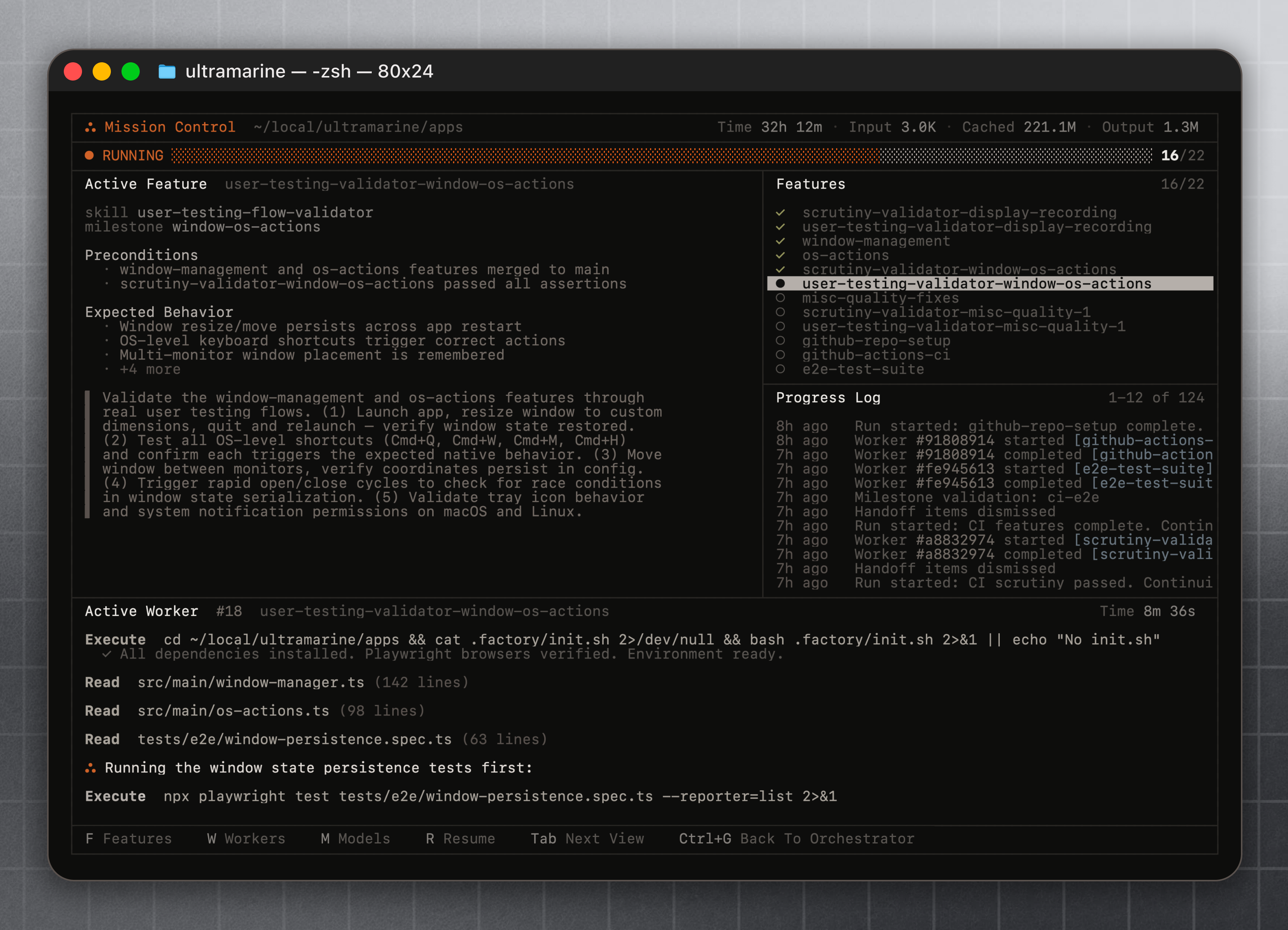
Factory Missions は、Droid を使って大規模でマルチ機能の作業を構造化された方法で取り組むための仕組みです。すべてを単一のセッションで処理するのではなく、まず Droid と協力してプラン(機能、マイルストーン、各部分を達成するために必要なスキル)を構築し、その後作業を管理するオーケストレーション層に実行を委ねます。 Factory Missions には/missions コマンドでアクセスできます(/mission でも利用可能)。
共同計画
コードを書く前に、Droidと一緒に機能、マイルストーン、成功基準を定義します。
スキルを考慮した実行
既存のスキルを活用し、作業の各部分に合わせて新しい専門スキルを開発します。
構造化されたオーケストレーション
Mission Controlはエージェント全体の実行を管理し、計画に沿って進捗を追跡します。
設定は引き継がれます
MCP連携、スキル、フック、カスタムDroidはすべてFactory Missions内で動作します。
動作の仕組み
計画段階が最も重要
Factory Missions において最も価値があるのは計画段階です。事前のプランを正しく組み立てる(機能、順序、マイルストーン、関連するスキル)ことが、実行の成功を決定します。Droid は異議を唱え、質問を投げかけ、プランが確実になるまであなたと反復作業を行います。 これは意図的なものです。明確なマイルストーンを持つ適切にスコープされたプランは、曖昧な目標でいきなり実行に飛び込むよりもはるかに良い結果を生み出します。検証
- マイルストーンは検証頻度を定義します。検証ワーカーは各マイルストーンの終了時に実行され、その作業を検証します。シンプルなプロジェクトでは1つのマイルストーンで十分なことが多いですが、より長期または複雑なプロジェクトでは、より頻繁なマイルストーン検証が作業の規模拡大時の基盤安定性を保つのに役立ちます。
コストと期間の見積もり
大まかな計画のヒューリスティックとして、ミッションの期間とコストはワーカーの実行回数に比例します:- 機能ワーカー: 機能あたり約1回の実行
- 検証ワーカー: マイルストーンあたり約1回の実行
total runs ≈ #features + 2 * #milestones
実際には、これは上限ではなく下限です。検証でフォローアップ作業が必要な問題が浮上する可能性があり、オーケストレーターは実行中に追加の修正機能を作成できます。
Factory Missions が適している用途
私たちは様々な作業で Factory Missions を構築・テストしてきました:- フルスタック開発 — フロントエンド、バックエンド、データベース、デプロイメントを含む完全なアプリケーションの構築
- リサーチ — 複数のアプローチを探索し、発見を統合し、構造化された出力を生成する深い調査タスク
- ブラウンフィールド移行 — 既存の動作を保持しながら、既存コードベースの現代化、フレームワークの交換、大規模プロジェクトの再構築
- 野心的なプロトタイプ — 単なるスケッチではなく、機能的である必要がある製品実験
Mission Control での作業
プランが承認されると、Droid は実行を管理するオーケストレーションビューである Mission Control に入ります。ここから機能とマイルストーンの進捗を追跡し、どのエージェントが何に取り組んでいるかを確認し、調整が必要な時に介入できます。介入とリダイレクト
Factory Missions は設定したら放置するものではありません。オーケストレーターはエージェントであり、会話することができます。Factory Missions を最も効果的に使用する方法は、自分をプロジェクトマネージャーとして扱うことです - 進捗を監視し、ワーカーのブロックを解除し、プランの変更が必要な時にリダイレクトします。missionが停止または進行しない
missionが停止または進行しない
missionが止まって何も起きていないように見える場合は、オーケストレーターを一時停止し、見えている状況を伝えます。直接的に、missionが停止または壊れているように見えること、最後に見えたアクティビティ、復旧してほしいことを説明してください。オーケストレーターは状態を再評価し、再開できます。例: “The mission seems frozen — the last worker finished 10 minutes ago and nothing new has started. Re-assess and continue.”
ワーカーが1つの項目に時間をかけすぎている
ワーカーが1つの項目に時間をかけすぎている
1つのworkerが意味のある進捗なしに長時間タスクで止まっている場合、完了を待つ必要はありません。オーケストレーターを一時停止し、現在の項目を完了としてマークして次へ進むよう伝えます。その項目には後で戻ることも、手動で対応することもできます。例: “The worker on the auth integration has been stuck for 20 minutes. Mark it as complete and move to the next feature.”
missionがマイルストーンで詰まっている
missionがマイルストーンで詰まっている
以前の前提が間違っていたり、依存関係が不足していたりして、オーケストレーターがブロックされたマイルストーンに到達することがあります。この場合は、残りの作業を再評価し、なぜブロックされたのかを特定するよう依頼します。障害を回避する再計画、機能の並べ替え、マイルストーン範囲の調整が可能です。例: “We are stuck on Milestone 3. Re-assess the remaining work and tell me what is blocking progress.”
missionの途中で方向転換したい
missionの途中で方向転換したい
計画を変更する必要があると気づいた場合(機能を削除する、新しい要件が入った、アプローチが間違っているなど)は、一時停止してオーケストレーターに伝えます。計画を更新し、マイルストーンのスコープを見直し、新しい方向から続行できます。例: “Drop the email notification feature and add Slack integration instead. Re-plan the remaining milestones.”
新しい種類のデバッグ
Factory Missions で作業するスキルセットは、従来のデバッグというよりもエージェントのプロジェクト管理に近いものです。コードを1行ずつステップ実行するのではなく、ワーカーチームを監視し、詰まった時にブロックを解除し、優先順位が変わった時にリダイレクトし、押し通すか再計画するかの判断を下します。 これは AI との意味的に異なる作業方法です。核となるスキルは、いつどのように介入するかを知ることであり、自分でコードを書くことではありません。設定の継承
Factory Missions は既存の Droid 設定を継承します:- MCP 統合 — ワーカーは接続されたツール(Linear、Sentry、Notion など)を使用できます
- カスタムスキル — 既存のスキルが利用可能で、計画中に新しいものを開発できます
- フック — ライフサイクルフックはミッション実行中に発火します
- カスタム droids — プロジェクトで設定されたサブエージェントがワーカーで利用できます
- AGENTS.md — ワーカーはプロジェクトの慣例とコーディング標準に従います
ヘッドレスでのミッション実行
ミッションはdroid exec --mission を使って非対話的に実行することもできます。これは CI、スケジュール実行、ライブ TUI なしでオーケストレーターに計画と実行を任せたい環境で便利です。
| フラグ | 説明 |
|---|---|
--mission | droid exec をミッションモード(マルチエージェントオーケストレーション)で実行します。 |
--worker-model <id> | ミッションワーカーエージェントが使用するモデル。 |
--worker-reasoning-effort <level> | ミッションワーカーエージェントの推論努力。 |
--validator-model <id> | ミッション検証エージェントが使用するモデル。 |
--validator-reasoning-effort <level> | ミッション検証エージェントの推論努力。 |
droid exec を参照してください。
設定
ミッションはmissionModelSettings オブジェクトといくつかのトップレベルキーで調整できます。これらはグローバルまたはプロジェクトの設定ファイルで指定します。
| 設定 | 説明 |
|---|---|
missionModelSettings.workerModel | ミッションワーカーサブエージェントが使用するデフォルトのモデル。 |
missionModelSettings.workerReasoningEffort | ミッションワーカーの推論努力(off、none、low、medium、high)。 |
missionModelSettings.validationWorkerModel | 検証ワーカー(scrutiny と user-testing)が使用するモデル。 |
missionModelSettings.validationWorkerReasoningEffort | 検証ワーカーの推論努力。 |
missionModelSettings.skipScrutiny | ミッション中の scrutiny 検証マイルストーンをスキップします。 |
missionModelSettings.skipUserTesting | ミッション中のユーザーテスト検証マイルストーンをスキップします。 |
missionOrchestratorModel | ミッションオーケストレーターが使用するモデル。 |
missionOrchestratorReasoningEffort | ミッションオーケストレーターの推論努力。 |
keepSystemAwakeDuringMissions | ミッション実行中に OS がスリープしないようにします。デフォルトは true。 |
Enterprise: ミッションへのアクセス制限
組織はmissionPolicy の組織レベル設定により、ミッションを起動できるユーザーを制限できます:
restrictedAccess が true の場合、allowedUserIds に列挙されたメンバーのみが新しいミッションを開始できます。組織向けポリシーの全容は設定リファレンスを参照してください。
未解決の問題
Factory Missions は初期段階です。まだ取り組んでいる根本的な問題があるため、これをリサーチプレビューとして提供しています:- 並列化は必要か? 複数のエージェントを並列実行するのは理論的には良く聞こえますが、実際に逐次実行よりも良い結果を生み出すのでしょうか?これをテストしています。
- 正確性を最大化するには? 長期間のプランはエラーが蓄積されます。各段階でどの検証と修正戦略が最も効果的でしょうか?
- コスト vs. 品質のトレードオフ — オーケストレーターはどの程度積極的であるべきでしょうか?より多くの計画と検証は高コストを意味しますが、潜在的により良い出力をもたらします。適切なバランスはどこでしょうか?