

Why use cloud templates?
| Benefit | What it means for you |
|---|---|
| Zero setup | Open a session and start coding; no local installs or VM juggling. |
| Consistency | Every teammate (and CI job) runs the exact same environment. |
| Speed | Heavy builds run on powerful cloud CPUs; your laptop fan stays silent. |
| Isolation | Experiments live in disposable templates, keeping your local machine clean. |
| Collaboration | Share a template link; reviewers jump into the live environment with code and ports already running. |
Installation & Usage
A cloud template is a fully-configured, on-demand development environment that lives in the cloud. Cloud templates give you the same tools and dependencies you’d expect locally, so you can build, test, and run code directly from Factory.To get the most out of cloud templates, configure environment variables and a setup script during template creation. The setup script installs dependencies and prepares your development environment automatically, ensuring every team member has an identical setup.
System Requirements
- A repository enabled in Factory
- User role or higher to create cloud templates
Open Cloud Templates Settings
- In Factory, click the Settings icon from the left sidebar.
- Select Cloud Templates.
Create a New Cloud Template
- Click Create Template.
- Enter the repository you want to use.
- Give your template a friendly name (e.g., “frontend-template”).
- (Optional) Configure a setup script to run during template initialization.
- Click Create.
Factory clones your repo and prepares the environment—this can take a minute for large projects.
Launching a Cloud Template inside a Session
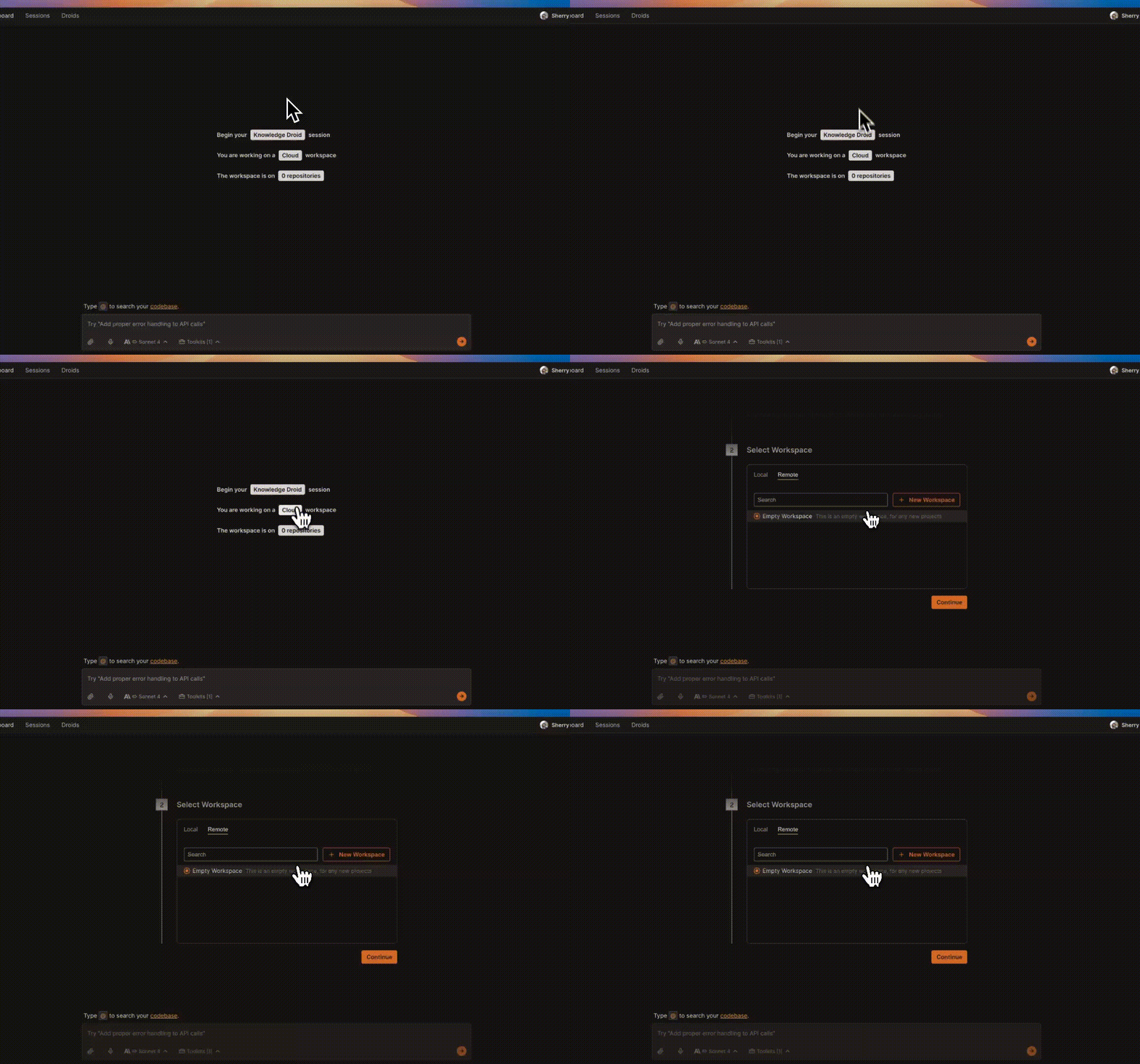
Connect to Cloud Machine
- On the session start page, click the Machine Connection button.
- Choose Remote tab.
- Select the template you created earlier.
- Factory attaches the cloud template to your session.
Everyday Usage
Run CLI Commands
Use the Terminal toolkit to execute commands like:
npm run dev
pytest
git status
Output streams live into chat and logs.
Edit & Save Files
Open files from the repo, make changes, and save.
Files persist in the cloud template and can be committed upstream when ready.
Auto-Save Controls
Auto-save is disabled by default—enable it from the Session Settings panel whenever you want live file syncing.
Setup Script
The setup script is a shell script that Factory runs during template creation, after your repository is cloned and before the template is activated. Use this feature to set up your template and give droid tools to work with your codebase.How to define a setup script
- In the modal for template creation, in the “Setup Script (Optional)” section, add your initialization script. You can write a multi-line bash script with all the commands you need.
- Submit. The script runs in the repo root exactly as provided. Add
set -euo pipefailat the top of your script if you want strict error handling. Script failures will stop the build. - Keep your script non‑interactive and idempotent. Write commands that can be safely re-run.
- Review build logs if anything fails to see detailed output from your script execution.
- The script executes after repository cloning, inside the build container at the repo root.
- Environment variables specified in template settings are available during script execution.
- Errors are surfaced clearly (e.g.,
Setup script failed: ...) for quick fixes.
Setup script troubleshooting tips
| Issue | Fix |
|---|---|
| Setup fails with “Setup script failed: …” | Check the build logs for specific error messages. Run the script locally to debug, add error handling, use non‑interactive flags (e.g., -y), then retry. |
| Command not found | Install required tools earlier in your script or ensure they’re available in the base Ubuntu image. |
| Permission denied (scripts) | Make scripts executable (chmod +x ./scripts/setup.sh) or invoke via interpreter (bash ./scripts/setup.sh). |
| Env var not found | Add it in Environment Variables section and reference as $VAR. Avoid echoing secrets in your script. |
| Long builds | Keep your script minimal; prefer cached installs (npm ci over npm install); avoid heavy, non‑essential work. |
| Path/file not found | Scripts run at the repo root. Verify relative paths and that files exist after clone. |
Best Practices
Cloud templates let you spin up consistent, production-ready development environments in seconds. Below are field-tested practices that keep templates fast, predictable, and team-friendly.Smart setup script practices
| Practice | Why it matters | How to do it |
|---|---|---|
| Order commands by dependency | Later commands may depend on earlier installs. | Run package installation first: npm ci && npm run build or pip install -r requirements.txt && pytest -q |
| Use exact package managers | Consistent lockfiles prevent version drift. | Use npm ci (not npm install), pnpm -w i, or pip install -r requirements.txt for reproducible builds |
| Add error handling | Stops build on first failure, saves debugging time. | Start your script with #!/usr/bin/env bash and set -euo pipefail for proper error handling |
| Make scripts executable early | Avoid permission errors mid-build. | Add chmod +x ./scripts/setup.sh && bash ./scripts/setup.sh or use bash ./scripts/setup.sh directly |
| Keep scripts idempotent | Re-running setup shouldn’t break things. | Use flags like pip install --no-deps or check for existing files before creating them |
| Minimize heavy operations | Long builds slow down template creation. | Focus on essential setup; defer optional tools to manual installation later |
Tip: Test your setup script locally first. The script runs withbashat the repo root, and you can addset -euo pipefailfor strict error handling.
Workflow patterns that scale
Spin-Up-Per-Task
Spin-Up-Per-Task
Treat remote sessions as disposable: create one per ticket or PR, then archive when merged.
Benefits: perfect isolation, zero “works on my machine” drift.
Parallel Environments
Parallel Environments
Need to test multiple branches? Launch two separate sessions; switch context without killing processes.
Team collaboration tips
| Tip | Details |
|---|---|
| Name templates clearly | Name templates according to the tracked repository, e.g. repo-name to work on a repository named repo-name. |
| Document entry commands | Add an AGENTS.md file with common tasks (npm run dev, pytest). Droid automatically reads this file. |
Troubleshooting
Even the smoothest cloud template can hit a snag. This section walks you through the quickest fixes for the most common cloud template issues.Quick reference
| Category | Typical Symptoms |
|---|---|
| Workspace Creation | “Provisioning” forever, cloning errors, setup script fails |
| Connection | Can’t attach from session, pairing spinner never stops, “Machine unavailable” |
| Performance | Slow rebuilds, high latency in terminal, laggy editor |
| Devcontainer | Build errors, “command not found”, ports not reachable |
| General Usage | Git asks for credentials, disk full, permission denied |
Workspace creation issues
Repository clone failed
Repository clone failed
Diagnose
- Error toast shows “clone failed” with a Git exit code
- Private repo? Missing OAuth scopes?
- Verify the repo is enabled and displays Connected in Integrations
- Refresh your OAuth token if prompted
Connection problems
Check Machine Selector
In your session, click the CPU icon → ensure Cloud Machine is selected.
If it shows Local Machine, switch to Cloud Machine and pick the template.
Performance & speed
| Symptom | Fix |
|---|---|
| Rebuild takes > 5 min | Add .dockerignore for node_modules, *.pyc, build outputs• Use a lighter base image (e.g., alpine) |
| Terminal latency | Close unused browser tabs with heavy JS• Check local bandwidth (>5 Mbps recommended)• Pause real-time spell-checker extensions |
| Editor lag | Disable file watchers in dev tools (nodemon, webpack --watch) unless needed• Use auto-save only when collaborating |
General usage troubles
| Issue | Resolution |
|---|---|
| Git prompts for credentials | Make sure the repo integration is connected; cloud template injects HTTPS tokens automatically. |
| Disk quota exceeded | Clear package caches (npm cache clean --force, pip cache purge), remove large build artifacts, or rebuild template. |
| Permission denied on file save | File is outside the repo template; save inside /workspaces/<repo>/. |
| Cannot install global packages | Use npm install -g or pip install --user. If still blocked, add commands to postCreateCommand. |
| History lost after rebuild | Anything outside /workspaces is cleared during rebuild. Commit important scripts or store them inside the repo. |
A quick rebuild fixes 80 % of issues—don’t hesitate to click Rebuild when in doubt.