> ## Documentation Index
> Fetch the complete documentation index at: https://docs.factory.ai/llms.txt
> Use this file to discover all available pages before exploring further.
# Bring Your Own Key (BYOK)
> Connect your own API keys, use open source models, or run local models
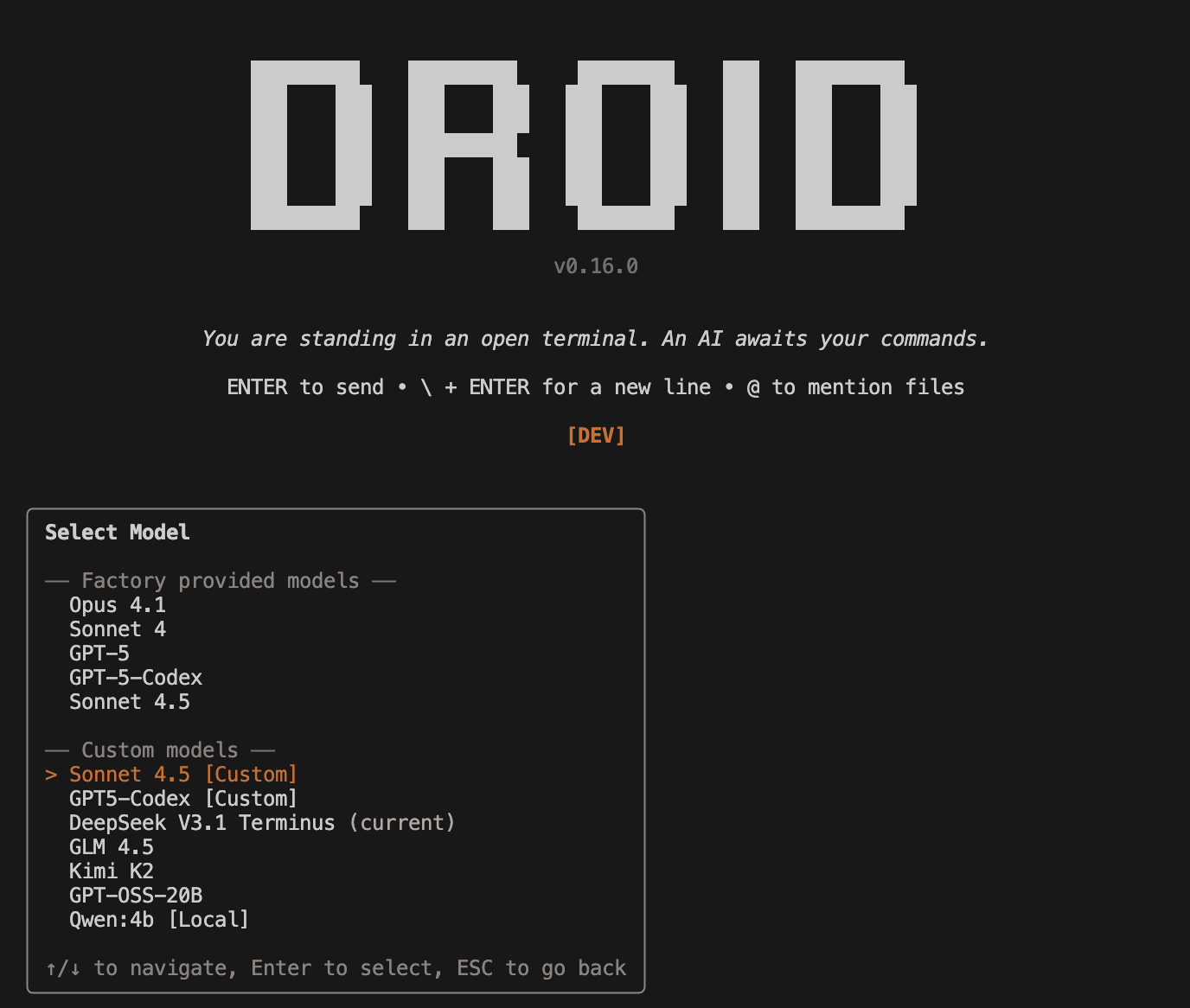
The Droid CLI supports custom model configurations through BYOK (Bring Your Own Key). Use your own OpenAI or Anthropic keys, connect to any open source model providers, or run models locally on your hardware. Once configured, switch between models using the `/model` command.
For Factory-managed models and multipliers, see [Available Models](/models).
Your API keys remain local and are not uploaded to Factory servers. Custom models are only available in the CLI and won't appear in Factory's web or mobile platforms.
 [Install the CLI with the 5-minute quickstart →](/cli/getting-started/quickstart)
***
## Configuration Reference
Add custom models to `~/.factory/settings.json` under the `customModels` array:
```json theme={null}
{
"customModels": [
{
"model": "your-model-id",
"displayName": "My Custom Model",
"baseUrl": "https://api.provider.com/v1",
"apiKey": "${PROVIDER_API_KEY}",
"provider": "generic-chat-completion-api",
"maxOutputTokens": 16384
}
]
}
```
In `settings.json` (and `settings.local.json`), `apiKey` supports environment variable references using `${VAR_NAME}` syntax. For example, `"apiKey": "${PROVIDER_API_KEY}"` reads from the environment variable named `PROVIDER_API_KEY` (for example: `export PROVIDER_API_KEY=your_key_here`).
**Legacy support**: Custom models in `~/.factory/config.json` using snake\_case field names (`custom_models`, `base_url`, etc.) are still supported for backwards compatibility. Both files are loaded and merged, with `settings.json` taking priority. Env var expansion for `apiKey` applies to `settings.json`/`settings.local.json` and not to legacy `config.json`.
### Supported Fields
| Field | Type | Required | Description |
| ----------------- | --------- | -------- | ---------------------------------------------------------------------------------------------------------------------------------------------------------------------------------------------- |
| `model` | `string` | ✓ | Model identifier sent via API (e.g., `claude-sonnet-4-5-20250929`, `gpt-5-codex`, `qwen3:4b`) |
| `displayName` | `string` | | Human-friendly name shown in model selector |
| `baseUrl` | `string` | ✓ | API endpoint base URL |
| `apiKey` | `string` | ✓ | Your API key for the provider. Can't be empty. Supports `${VAR_NAME}` in `settings.json`/`settings.local.json` (e.g., `${PROVIDER_API_KEY}` uses the `PROVIDER_API_KEY` environment variable). |
| `provider` | `string` | ✓ | One of: `anthropic`, `openai`, or `generic-chat-completion-api` |
| `maxOutputTokens` | `number` | | Maximum output tokens for model responses |
| `noImageSupport` | `boolean` | | Set to `true` to disable image inputs for this model |
| `extraArgs` | `object` | | Additional provider-specific arguments to include in API requests |
| `extraHeaders` | `object` | | Additional HTTP headers to send with requests |
### Using extraArgs
Pass provider-specific parameters like temperature or top\_p:
```json theme={null}
{
"customModels": [
{
"model": "your-model",
"displayName": "Custom Model",
"baseUrl": "https://your-provider.com/v1",
"apiKey": "YOUR_API_KEY",
"provider": "generic-chat-completion-api",
"extraArgs": {
"temperature": 0.7,
"top_p": 0.9
}
}
]
}
```
### Using extraHeaders
Add custom HTTP headers to API requests:
```json theme={null}
{
"customModels": [
{
"model": "your-model",
"displayName": "Custom Model",
"baseUrl": "https://your-provider.com/v1",
"apiKey": "YOUR_API_KEY",
"provider": "generic-chat-completion-api",
"extraHeaders": {
"X-Custom-Header": "value",
"Authorization": "Bearer YOUR_TOKEN"
}
}
]
}
```
***
## Understanding Providers
Factory supports three provider types that determine API compatibility:
| Provider | API Format | Use For | Documentation |
| ----------------------------- | ------------------------------------ | --------------------------------------------------------------------------------------------------------------------- | ---------------------------------------------------------------------------------- |
| `anthropic` | Anthropic Messages API (v1/messages) | Anthropic models on their official API or compatible proxies | [Anthropic Messages API](https://docs.claude.com/en/api/messages) |
| `openai` | OpenAI Responses API | OpenAI models on their official API or compatible proxies. Required for the newest models like GPT-5 and GPT-5-Codex. | [OpenAI Responses API](https://platform.openai.com/docs/api-reference/responses) |
| `generic-chat-completion-api` | OpenAI Chat Completions API | OpenRouter, Fireworks, Together AI, Ollama, vLLM, and most open-source providers | [OpenAI Chat Completions API](https://platform.openai.com/docs/api-reference/chat) |
Factory is actively verifying Droid's performance on popular models, but we cannot guarantee that all custom models will work out of the box. Only Anthropic and OpenAI models accessed via their official APIs are fully tested and benchmarked.
**Model Size Consideration**: Models below 30 billion parameters have shown significantly lower performance on agentic coding tasks. While these smaller models can be useful for experimentation and learning, they are generally not recommended for production coding work or complex software engineering tasks.
***
## Prompt Caching
The Droid CLI automatically uses prompt caching when available to reduce API costs:
* **Official providers (`anthropic`, `openai`)**: Factory attempts to use prompt caching via the official APIs. Caching behavior follows each provider's implementation and requirements.
* **Generic providers (`generic-chat-completion-api`)**: Prompt caching support varies by provider and cannot be guaranteed. Some providers may support caching, while others may not.
### Verifying Prompt Caching
To check if prompt caching is working correctly with your custom model:
1. Run a conversation with your custom model
2. Use the `/cost` command in the Droid CLI to view cost breakdowns
3. Look for cache hit rates and savings in the output
If you're not seeing expected caching savings, consult your provider's documentation about their prompt caching support and requirements.
***
## Quick Start
Choose a provider from the left navigation to see specific configuration examples:
* **[Baseten](/cli/byok/baseten)** - Deploy and serve custom models
* **[DeepInfra](/cli/byok/deepinfra)** - Cost-effective inference for open-source models
* **[Fireworks AI](/cli/byok/fireworks)** - High-performance inference for open-source models
* **[Google Gemini](/cli/byok/google-gemini)** - Access Google's Gemini models
* **[Groq](/cli/byok/groq)** - Ultra-fast inference with Groq's LPU™ Inference Engine
* **[Hugging Face](/cli/byok/huggingface)** - Connect to models on HF Inference API
* **[Ollama](/cli/byok/ollama)** - Run models locally or in the cloud
* **[OpenAI & Anthropic](/cli/byok/openai-anthropic)** - Use your own API keys for official models
* **[OpenRouter](/cli/byok/openrouter)** - Access multiple providers through a single interface
***
## Using Custom Models
Once configured, access your custom models in the CLI:
1. Use the `/model` command
2. Your custom models appear in a separate "Custom models" section below Factory-provided models
3. Select any model to start using it
Custom models display with the name you set in `displayName`, making it easy to identify different providers and configurations.
***
## Troubleshooting
### Model not appearing in selector
* Check JSON syntax in `~/.factory/settings.json` (or `config.json` if using legacy format)
* Settings changes are detected automatically via file watching
* Verify all required fields are present
### "Invalid provider" error
* Provider must be exactly `anthropic`, `openai`, or `generic-chat-completion-api`
* Check for typos and ensure proper capitalization
### Authentication errors
* Verify your API key is valid and has available credits
* Check that the API key has proper permissions
* Confirm the base URL matches your provider's documentation
### Local model won't connect
* Ensure your local server is running (e.g., `ollama serve`)
* Verify the base URL is correct and includes `/v1/` suffix if required
* Check that the model is pulled/available locally
### Rate limiting or quota errors
* Check your provider's rate limits and usage quotas
* Monitor your usage through your provider's dashboard
[Install the CLI with the 5-minute quickstart →](/cli/getting-started/quickstart)
***
## Configuration Reference
Add custom models to `~/.factory/settings.json` under the `customModels` array:
```json theme={null}
{
"customModels": [
{
"model": "your-model-id",
"displayName": "My Custom Model",
"baseUrl": "https://api.provider.com/v1",
"apiKey": "${PROVIDER_API_KEY}",
"provider": "generic-chat-completion-api",
"maxOutputTokens": 16384
}
]
}
```
In `settings.json` (and `settings.local.json`), `apiKey` supports environment variable references using `${VAR_NAME}` syntax. For example, `"apiKey": "${PROVIDER_API_KEY}"` reads from the environment variable named `PROVIDER_API_KEY` (for example: `export PROVIDER_API_KEY=your_key_here`).
**Legacy support**: Custom models in `~/.factory/config.json` using snake\_case field names (`custom_models`, `base_url`, etc.) are still supported for backwards compatibility. Both files are loaded and merged, with `settings.json` taking priority. Env var expansion for `apiKey` applies to `settings.json`/`settings.local.json` and not to legacy `config.json`.
### Supported Fields
| Field | Type | Required | Description |
| ----------------- | --------- | -------- | ---------------------------------------------------------------------------------------------------------------------------------------------------------------------------------------------- |
| `model` | `string` | ✓ | Model identifier sent via API (e.g., `claude-sonnet-4-5-20250929`, `gpt-5-codex`, `qwen3:4b`) |
| `displayName` | `string` | | Human-friendly name shown in model selector |
| `baseUrl` | `string` | ✓ | API endpoint base URL |
| `apiKey` | `string` | ✓ | Your API key for the provider. Can't be empty. Supports `${VAR_NAME}` in `settings.json`/`settings.local.json` (e.g., `${PROVIDER_API_KEY}` uses the `PROVIDER_API_KEY` environment variable). |
| `provider` | `string` | ✓ | One of: `anthropic`, `openai`, or `generic-chat-completion-api` |
| `maxOutputTokens` | `number` | | Maximum output tokens for model responses |
| `noImageSupport` | `boolean` | | Set to `true` to disable image inputs for this model |
| `extraArgs` | `object` | | Additional provider-specific arguments to include in API requests |
| `extraHeaders` | `object` | | Additional HTTP headers to send with requests |
### Using extraArgs
Pass provider-specific parameters like temperature or top\_p:
```json theme={null}
{
"customModels": [
{
"model": "your-model",
"displayName": "Custom Model",
"baseUrl": "https://your-provider.com/v1",
"apiKey": "YOUR_API_KEY",
"provider": "generic-chat-completion-api",
"extraArgs": {
"temperature": 0.7,
"top_p": 0.9
}
}
]
}
```
### Using extraHeaders
Add custom HTTP headers to API requests:
```json theme={null}
{
"customModels": [
{
"model": "your-model",
"displayName": "Custom Model",
"baseUrl": "https://your-provider.com/v1",
"apiKey": "YOUR_API_KEY",
"provider": "generic-chat-completion-api",
"extraHeaders": {
"X-Custom-Header": "value",
"Authorization": "Bearer YOUR_TOKEN"
}
}
]
}
```
***
## Understanding Providers
Factory supports three provider types that determine API compatibility:
| Provider | API Format | Use For | Documentation |
| ----------------------------- | ------------------------------------ | --------------------------------------------------------------------------------------------------------------------- | ---------------------------------------------------------------------------------- |
| `anthropic` | Anthropic Messages API (v1/messages) | Anthropic models on their official API or compatible proxies | [Anthropic Messages API](https://docs.claude.com/en/api/messages) |
| `openai` | OpenAI Responses API | OpenAI models on their official API or compatible proxies. Required for the newest models like GPT-5 and GPT-5-Codex. | [OpenAI Responses API](https://platform.openai.com/docs/api-reference/responses) |
| `generic-chat-completion-api` | OpenAI Chat Completions API | OpenRouter, Fireworks, Together AI, Ollama, vLLM, and most open-source providers | [OpenAI Chat Completions API](https://platform.openai.com/docs/api-reference/chat) |
Factory is actively verifying Droid's performance on popular models, but we cannot guarantee that all custom models will work out of the box. Only Anthropic and OpenAI models accessed via their official APIs are fully tested and benchmarked.
**Model Size Consideration**: Models below 30 billion parameters have shown significantly lower performance on agentic coding tasks. While these smaller models can be useful for experimentation and learning, they are generally not recommended for production coding work or complex software engineering tasks.
***
## Prompt Caching
The Droid CLI automatically uses prompt caching when available to reduce API costs:
* **Official providers (`anthropic`, `openai`)**: Factory attempts to use prompt caching via the official APIs. Caching behavior follows each provider's implementation and requirements.
* **Generic providers (`generic-chat-completion-api`)**: Prompt caching support varies by provider and cannot be guaranteed. Some providers may support caching, while others may not.
### Verifying Prompt Caching
To check if prompt caching is working correctly with your custom model:
1. Run a conversation with your custom model
2. Use the `/cost` command in the Droid CLI to view cost breakdowns
3. Look for cache hit rates and savings in the output
If you're not seeing expected caching savings, consult your provider's documentation about their prompt caching support and requirements.
***
## Quick Start
Choose a provider from the left navigation to see specific configuration examples:
* **[Baseten](/cli/byok/baseten)** - Deploy and serve custom models
* **[DeepInfra](/cli/byok/deepinfra)** - Cost-effective inference for open-source models
* **[Fireworks AI](/cli/byok/fireworks)** - High-performance inference for open-source models
* **[Google Gemini](/cli/byok/google-gemini)** - Access Google's Gemini models
* **[Groq](/cli/byok/groq)** - Ultra-fast inference with Groq's LPU™ Inference Engine
* **[Hugging Face](/cli/byok/huggingface)** - Connect to models on HF Inference API
* **[Ollama](/cli/byok/ollama)** - Run models locally or in the cloud
* **[OpenAI & Anthropic](/cli/byok/openai-anthropic)** - Use your own API keys for official models
* **[OpenRouter](/cli/byok/openrouter)** - Access multiple providers through a single interface
***
## Using Custom Models
Once configured, access your custom models in the CLI:
1. Use the `/model` command
2. Your custom models appear in a separate "Custom models" section below Factory-provided models
3. Select any model to start using it
Custom models display with the name you set in `displayName`, making it easy to identify different providers and configurations.
***
## Troubleshooting
### Model not appearing in selector
* Check JSON syntax in `~/.factory/settings.json` (or `config.json` if using legacy format)
* Settings changes are detected automatically via file watching
* Verify all required fields are present
### "Invalid provider" error
* Provider must be exactly `anthropic`, `openai`, or `generic-chat-completion-api`
* Check for typos and ensure proper capitalization
### Authentication errors
* Verify your API key is valid and has available credits
* Check that the API key has proper permissions
* Confirm the base URL matches your provider's documentation
### Local model won't connect
* Ensure your local server is running (e.g., `ollama serve`)
* Verify the base URL is correct and includes `/v1/` suffix if required
* Check that the model is pulled/available locally
### Rate limiting or quota errors
* Check your provider's rate limits and usage quotas
* Monitor your usage through your provider's dashboard